 WorkFlow
Download the timesheet templates as PDF and Excel
- Download the weekly template as PDF1 A4 page to print, 2 lines per day for split shifts · 77 KB
- Download the weekly template as Excel7 day rows + 4 extra rows, with formulas, a check column and a guide · 13 KB
- Download the monthly template as PDF2 A4 pages to print, subtotal on page 1 · 88 KB
- Download the monthly template as Excel31 day rows + 6 extra rows, with formulas, a check column and a guide · 17 KB
The file lands in your browser's download folder. Excel: first enter the first day of the period at the top. PDF: print it and fill it in by hand. How to fill it in ↓
September 2026 edition. The files carry only a source line at the foot.
What belongs on a timesheet?
Timesheet, time record or hours sheet: the same document, one that records start, end, breaks and net working time per working day. It contains:
- name, employer and period
- the date of every working day
- start, end and the breaks taken
- net working time per day and the total for the period
- signature fields, if your workplace wants them
What the template looks like
The printable sheet is deliberately plain: a head with name, employer and period, one line per day (two in the weekly sheet), totals and signature fields at the end. The fields:
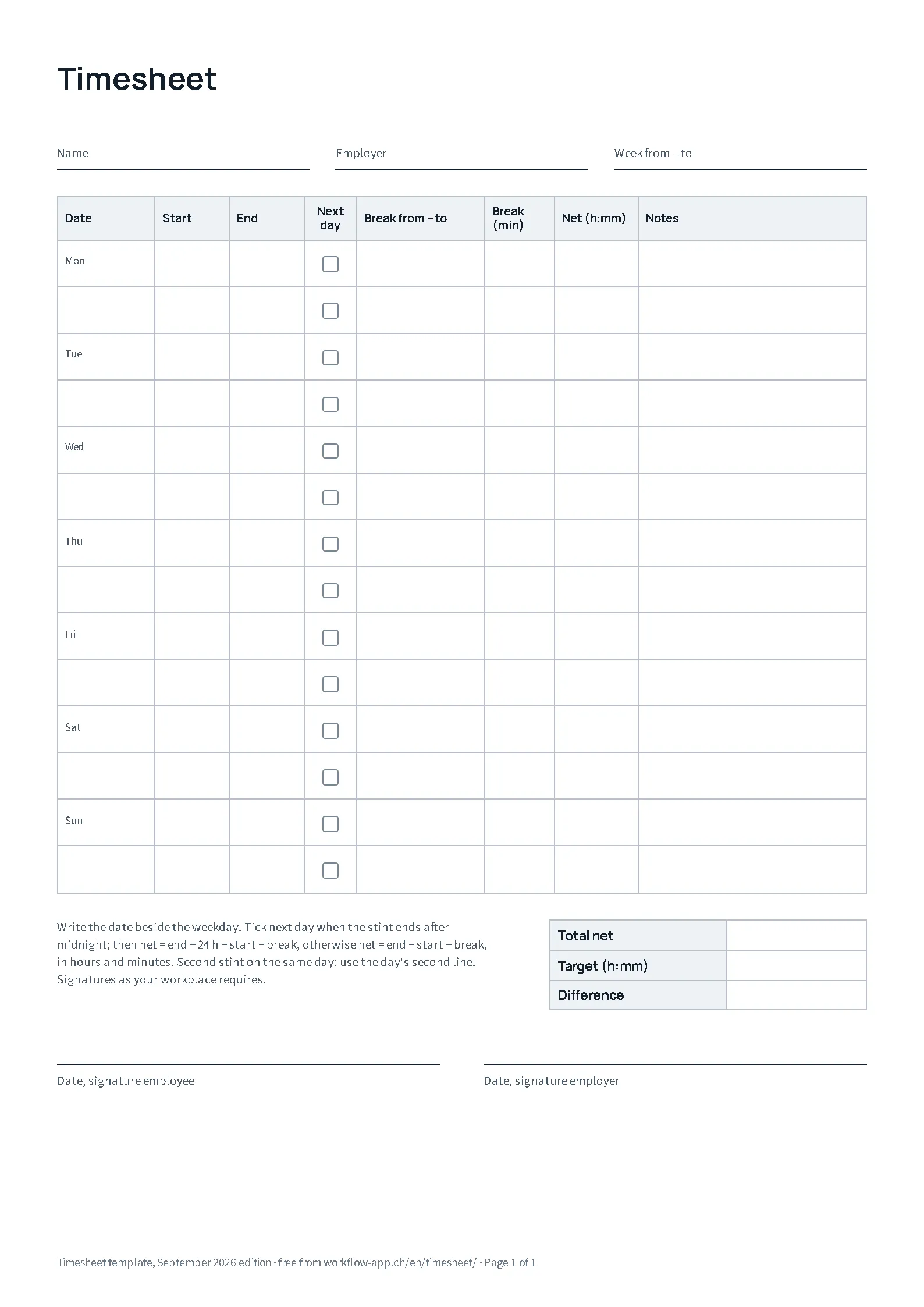 Weekly template, one page · Open the PDF (new tab) →
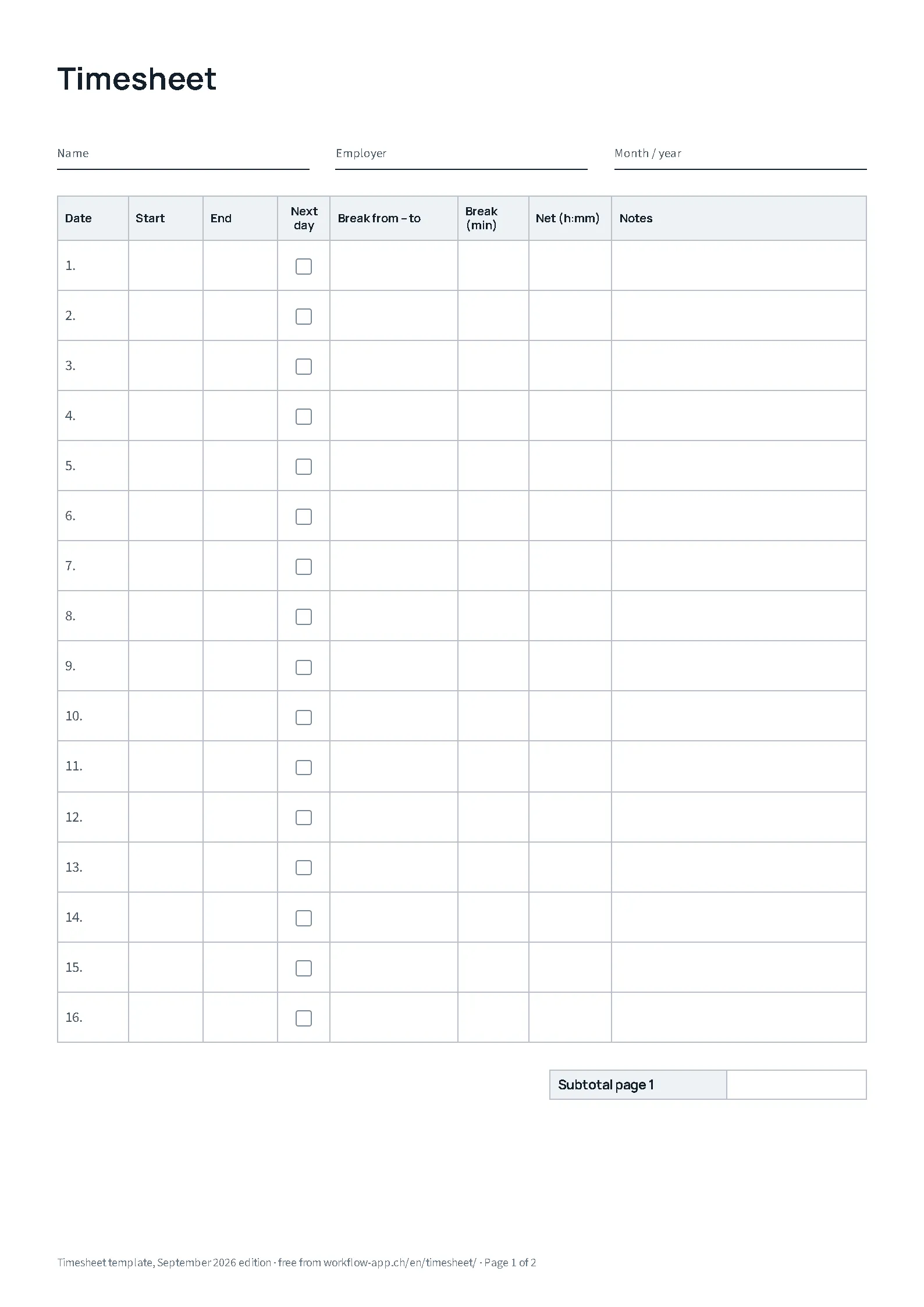 Monthly template, page 1 of 2. Totals and signatures are on page 2 · Open the PDF (new tab) →
- Date
- The day of the stint. In Excel the column fills from the first day of the period, with the weekday, and stops where the calendar stops.
- Start and end
- The time you actually started and stopped, not the contractual one.
- Next day
- Tick it when the stint ends after midnight, so 22:00 to 06:00 reads as eight hours instead of an error.
- Break from – to
- When you took the break. Under regular recording in Switzerland the employer must record when a break of 30 minutes or more was taken, not only how long.[1]
- Break (min)
- The sum of breaks deducted from the working time.
- Net
- End minus start minus break, in hours and minutes.
- Notes
- A second stint, a compensatory rest day, the reason for extra hours. No diagnoses, nothing private.
- Total, target, difference
- Time worked, time expected, and what lies between. You enter the target yourself.
- Signatures
- Fields for agreeing the sheet with your employer. None of the rules below makes a signature generally mandatory; the German minimum-wage records, for instance, need none.[2]
How to fill in the timesheet
Enter your name, employer and period, then per day the start, the end and the break you actually took. Excel computes the net time and the difference to your target. Which further details are required depends on the country and on your workplace's rules; the legal notes below cover Germany, Switzerland and Austria.
- Fill in the head. Name, employer and period. Staff number or site, if your workplace wants them, go in the notes.
- Enter each day on the same day. A record kept as you go is more credible than a week reconstructed on Friday. Enter the real times, not the contractual ones.
- Deduct breaks honestly. Only the break you actually took. A lunch worked through is working time; a longer break than planned is not.
- Check and keep it. Add up, compare with the target and keep your own copy, so you do not depend on later access to the workplace system.
A filled-in example day
Scroll sideways on small screens.
| Date | Start | End | Next day | Break from – to | Break (min) | Net (h:mm) | Notes |
|---|---|---|---|---|---|---|---|
| Tue 8 Sep | 07:50 | 17:05 | 12:15 – 12:45 | 30 | 8:45 | Prepared the delivery, extra hours at M. Keller's request |
9 hours 15 minutes present, 30 minutes of break, 8:45 net. The note records why it ran long and who wanted it, which is exactly what is missing later when overtime is discussed.
Excel: breaks, night shifts and target hours
The Excel template calculates in whole minutes and shows times as hours:minutes, so 7:30 is not read as 7.3. The shaded cells are inputs; date, net, total, difference and the check notes are computed. "Break from – to" sits to the right of net there.
- Night shift. 22:00 to 06:00, next day 1, break 30 minutes gives 7:30. Without the 1, the check column reports that the end is not after the start instead of silently assuming a night shift: a swapped end should stand out, not pass as a 15-hour night.
- Split shift. Two stints on one day go on two rows: the first on the day's row, the second on one of the rows under "Further stints" with the same date. The total counts both. The monthly sheet has six such rows, the weekly four. Rows you insert are not calculated; if you need more, use a second file or the weekly sheet.
- No break. Leave the break empty or enter 0. The template deducts nothing automatically, not even by legal thresholds; it deducts what you enter. The two break fields belong together: the minutes calculate, the time documents. A time without minutes is reported by the check column, and so is a number pasted as text.
- Target and difference. Enter the target as the expected hours of the period. Example: 160:00 planned hours minus 8:00 for a planned day you were absent all day gives 152:00. The template does not recognise absences and credits no time. The difference appears as +2:30 or −2:30.
- Errors stay visible. A break longer than the stint, an end before the start, a start without an end or a stint on a row without a valid date inside the period, say 30 February: the check column names the problem, the row turns red and net stays empty. The number of open rows appears beside the total, and the difference to the target stays empty as long as a checked entry contains an error.
- Across the month boundary and the clock change. A stint from midnight into the 1st belongs on both periods: on the 31st from 22:00 to 00:00 with next day 1, on the 1st from 00:00 to 06:00 with next day 0, the break in the part where it was taken. For the clock change in March and October, enter the deviation in the "Correction (min)" column, say +60 for the October night, and explain it in the notes; start and end stay as they were.
What applies in Germany, Switzerland and Austria?
The rules below are addressed to employers and govern their records. Your own sheet can support or complement that record; whether it replaces the workplace's procedure depends on the requirements there.
Germany
Under section 16(2) of the Working Time Act (ArbZG) the employer must record working time beyond eight hours per working day and keep those records for at least two years. The Federal Labour Court went further in 2022: as a rule, start and end, and so the duration, of daily working time including overtime must be recorded, subject to the statutory exceptions to its scope. The ruling does not impose electronic recording without exception; depending on the work and the company, paper can do, and a statutory rule has been announced. The employer stays responsible even when you enter the times yourself.[3][4][5]
For mini-jobs (marginal employment below the German earnings threshold) outside private households, and for sectors such as construction, hospitality, transport and cleaning, section 17 of the Minimum Wage Act (MiLoG) as a rule requires start, end and duration of daily working time, recorded by the seventh following calendar day and kept for two years; certain employees are exempt under the minimum-wage documentation ordinance. It does not require the position of breaks or signatures.[6][7][2]
Switzerland
Under regular recording within the scope of the Labour Act, Art. 73 of Ordinance 1 requires the employer to record, among other things, daily and weekly working time including overtime and when it fell, the position and duration of breaks of half an hour or more, and rest days, kept for at least five years after they cease to apply. That is why the template has a column for when the break was taken.[1]
Under Art. 73b a record of the daily total can suffice if you can set roughly a quarter of your working time yourself and an agreement to that effect exists; for night and Sunday work, start and end must still be recorded. A full record is always allowed, and the employer must give you a suitable means for it.[8]
Austria
Under section 26 of the Working Time Act (AZG) the employer keeps records of hours worked, as a rule start and end of working time and of rest breaks, kept for at least one year. Once a month you may ask for a free copy of your records.[9]
Proving overtime: what your own record can and cannot do
A timesheet records the working times you entered. For a claim to overtime pay in Germany you must additionally show that the employer brought the overtime about, that is ordered, approved or tolerated it, or that it was necessary for the work owed; the recording duty does not shift that burden by itself.[10]
So for extra hours, also note what work was needed and who ordered or approved it; that is what the notes column is for. A positive balance on the sheet shows your time; on its own it does not create a claim to pay.
Or let your timesheet write itself.
WorkFlow is free and without ads, without an account and without a cloud. The Android app records arriving at and leaving your saved workplaces automatically. You check the entries and add or correct start, end and breaks. From them the app creates a monthly timesheet as a PDF with signature lines.
In the app: Reports → Entries → export icon top right → Timesheet (signable) → pick the month → PDF. Name and employer are set once in Settings.
The automation needs background location access; location events can arrive late. Home-office hours you enter by hand. The app exports PDF and CSV, not Excel.

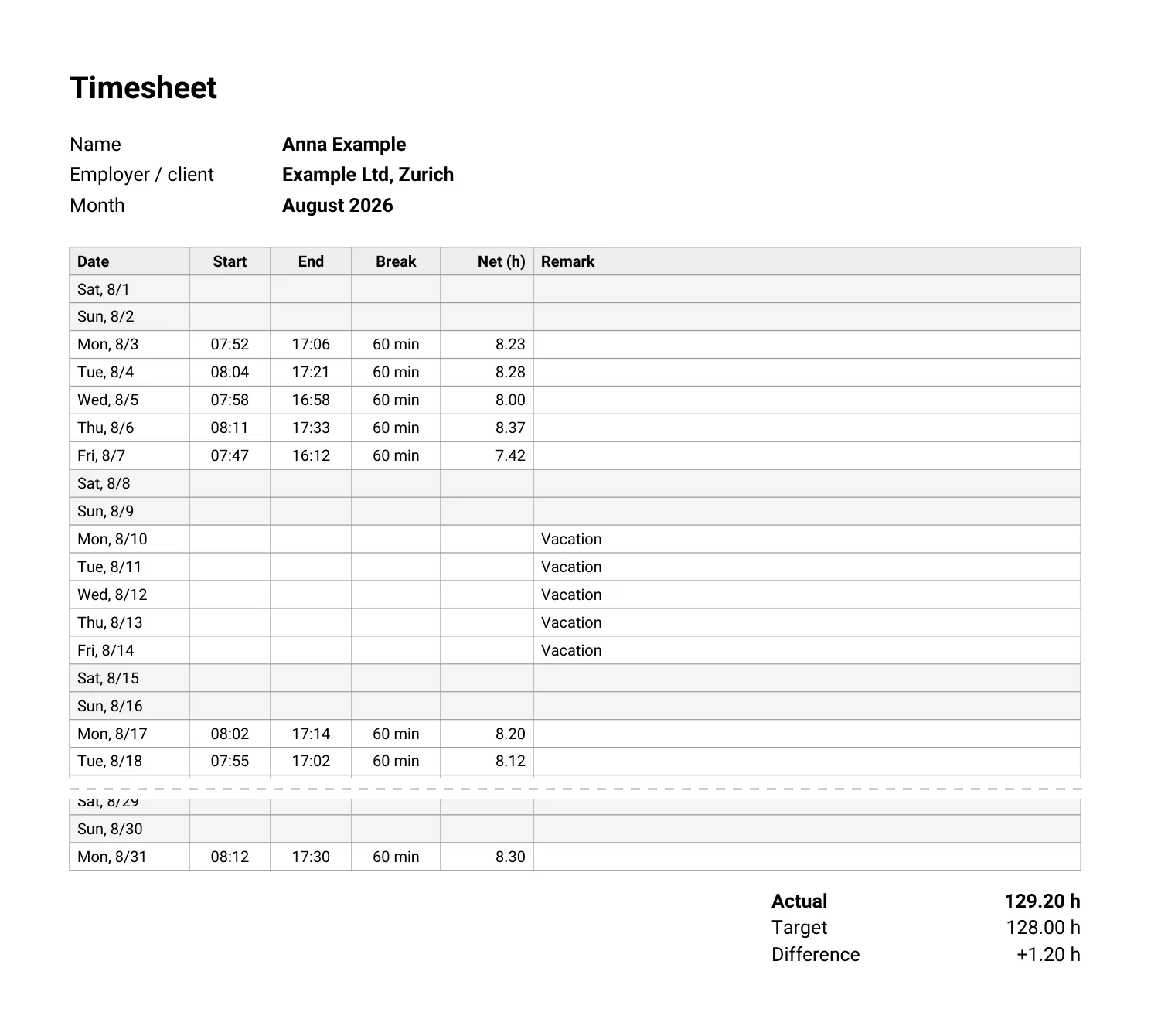 Open the sample timesheet PDF →
The sample uses decimal hours: +1.20 h is 1 hour and 12 minutes. The app's PDF carries the break duration but no column of its own for when the break started and ended. Where the position of breaks must be documented, you need a supplementary record for that.
Frequent questions
Is the template really free?
Yes. No sign-up, no e-mail, no watermark. The foot names where it came from, nothing more.
Does the timesheet have to be signed?
None of the rules above makes it generally mandatory; the German minimum-wage records, for instance, need no signature. The fields are for agreeing the sheet with your employer; whether they countersign is a workplace matter.[2]
Is the template enough for a German mini-job?
It contains start, end and duration, which is what section 17 MiLoG asks for. The record itself is the employer's duty; your copy complements it.[6]
Is there a fillable PDF?
No. To fill it in on screen, use the Excel file, which also calculates. The PDF is meant for printing.
Can I adapt the Excel file?
Yes. The sheet protection has no password and only guards the formulas against accidental overwriting: Review, Unprotect Sheet. Rows you insert afterwards are not calculated.
Sources
- SECO, Wegleitung zu Art. 73 ArGV 1
- BMAS: Dokumentationspflicht beim Mindestlohn
- § 16 Abs. 2 ArbZG
- BAG, 1 ABR 22/21
- BMAS: Fragen und Antworten zur Arbeitszeiterfassung
- § 17 MiLoG
- § 1 MiLoDokV
- SECO, Wegleitung zu Art. 73b ArGV 1
- Arbeitsinspektion: Aufzeichnung der Arbeitszeit, § 26 AZG
- BAG, 5 AZR 359/21
Written by Ivan Knezevic, developer of WorkFlow, Zürich. Updated on 7 September 2026.
Legal sources checked on 7 September 2026. The sources are in German. This page is not legal advice.